If you like your existing desktop but want adjustable working height, replacing its fixed legs with a standing desk frame can be a practical upgrade. You keep the surface that suits your room while changing how the desk adjusts.
However, compatibility involves more than desktop width. Thickness, material, mounting points, weight, and underside clearance all matter. A frame that physically fits beneath a surface may still be unsuitable for secure installation.
These five picks include four electric frames and one hand-crank alternative. Selections are based on published specifications rather than hands-on comparative testing.
Quick Comparison
Table of Contents
| Product | Adjustment | Published height range* | Main buying consideration |
|---|---|---|---|
| FLEXISPOT E7 | Dual-motor electric | 22.8–48.4 inches | Lower starting height; verify exact version |
| VIVO DESK-V103E | Dual-motor electric | 23.5–49.3 inches | Specifies a desktop at least ¾ inch thick |
| TOPSKY DF02.01 | Dual-motor electric |
43.3 × 23.6 inches |
height range and a stated 265-pound |
|
HUANUO HNESD52 |
Confirm the exact HNESD52 variant, |
24.4–50.4 inches | Specified desktop depth starts at 27.6 inches |
| Mount-It! MI-7931 | Hand crank | 28.7–47.6 inches | Check seated height and crank clearance |
Confirm whether the selected listing’s measurements include the desktop. Add top thickness to frame-only measurements.
1. FLEXISPOT E7 — Best to Shortlist for a Lower Starting Height
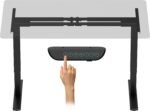
The FLEXISPOT E7 is worth considering if seated typing height is a priority. Its current US product page lists dual motors and a frame-only adjustment range of 22.8–48.4 inches.
The page also lists an adjustable frame width of 43.4–74.8 inches and an applicable desktop width of 47.2–80 inches. These are different measurements: frame expansion does not establish which desktop sizes are approved. E7 FlexiSpot
The relatively low starting height makes the E7 useful to investigate when your current desk feels too tall. You still need to account for desktop thickness.
 Why consider it:
- Low published frame-only minimum.
- Dual-motor adjustment.
- Memory presets on the listed configuration.
- Adjustable frame width.
Check before buying: Confirm the exact E7 generation, approved desktop depth and thickness, controller, and mounting instructions. E7 and E7 Pro specifications should not be treated as interchangeable.
2. VIVO DESK-V103E — Best for Clearly Stated Desktop Compatibility
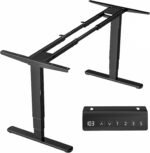
The VIVO DESK-V103E provides useful published requirements for a desktop-reuse project. VIVO recommends a tabletop:
- 40–85 inches long
- 23–43 inches deep
- At least ¾ inch thick
Its current product page lists dual motors, three-stage columns, a 23.5–49.3-inch height range, three memory settings, and a stated 220-pound capacity. desk solutions, screen mounting, and more
These details help narrow your search before purchasing. However, meeting the dimensions does not prove that a hollow or damaged tabletop can hold mounting screws securely.
 Why consider it:
- Explicit recommended tabletop dimensions.
- Published minimum thickness.
- Three memory presets.
- Dual-motor, three-stage design.
Check before buying: Inspect the material beneath the mounting points and confirm screw length against your desktop’s thickness. Follow the manual when calculating the permitted load.
3. TOPSKY DF02.01 — Best to Compare for a Conventional-Height Setup
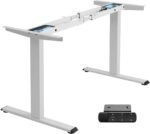
The TOPSKY DF02.01 is a dual-motor frame with memory presets and advertised anti-collision functionality. The identified Amazon listing gives a 27.6–47.3-inch height range, 43–59-inch width adjustment, and 225-pound capacity. amazon.com
Its higher minimum setting is the main buying consideration. Once a desktop is attached, the finished surface may be too high for someone who needs a low seated keyboard position.
This makes it a more useful comparison for buyers whose measured working heights fall comfortably within its range.
 Why consider it:
- Dual-motor adjustment.
- Memory presets.
- Adjustable frame width.
- Identified Amazon product listing.
Check before buying: Confirm approved tabletop dimensions, minimum thickness, and the height measurement convention. Keep the movement path clear even when anti-collision functionality is fitted.
4. HUANUO HNESD52 — Best to Compare for Wider Existing Desktops
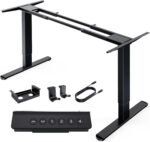
The HUANUO HNESD52 dual-motor standing desk frame is worth considering if you want to reuse a wider desktop. HUANUO lists compatible tabletop dimensions from approximately 43.3 × 23.6 inches to 89.8 × 31.5 inches, with frame width adjustment from 42.1 to 69.2 inches.
Its published specifications include a 28.3–47.2-inch height range and a stated 265-pound load capacity. The manufacturer identifies wood, MDF, and particleboard as desktop material options.
The higher minimum setting deserves attention. Check the finished surface height with your desktop attached, particularly if your current desk already feels too tall for seated typing.
 Why consider it:
- Compatibility with wider tabletops.
- Dual-motor adjustment.
- Adjustable frame width.
- Frame-only option for reusing an existing surface.
Check before buying: Confirm the exact HNESD52 variant, minimum desktop thickness, mounting requirements, and how desktop weight counts toward capacity. Check for solid mounting material beneath every screw location.
5. Mount-It! MI-7931 — Best for Adjustment Without a Motor
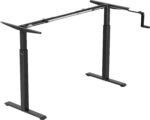
The Mount-It! MI-7931 offers a hand-crank alternative. The manufacturer lists a 28.7–47.6-inch height range, 41.7–55.1-inch width adjustment, and 132-pound capacity.
Suggested tabletop sizes run from 48 × 24 inches to 72 × 40 inches. Check the mounting requirements rather than assuming those outer dimensions settle every compatibility question. Mount-It!
A manual frame avoids an electrical requirement for lifting. The tradeoff is that every height change requires cranking, which may be less convenient if you switch positions frequently.
 Why consider it:
- No electrical connection needed for adjustment.
- Adjustable width.
- An alternative to motorized controls.
Check before buying: Add desktop thickness to the minimum height and check seated fit. Leave enough room to operate the crank without hitting drawers, chair arms, or nearby furniture.
How to Choose a Frame for Your Existing Desktop
 Measure Width, Depth, and Thickness
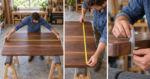
Record all three dimensions and compare them with the frame’s approved tabletop specifications.
Do not confuse adjustable frame width with recommended desktop width. The desktop generally extends beyond the frame, but acceptable overhang depends on the manufacturer’s guidance.
Inspect edge profiles, too. A thick-looking desktop may have a thinner center or decorative edging that does not provide suitable mounting depth.
Check Desktop Construction
The desktop needs suitable mounting material where the frame attaches. Hollow-core tops, thin panels, glass, stone, or damaged particleboard may require a different installation method or may be unsuitable.
If construction is uncertain, ask the frame manufacturer about your specific top. Physical size alone does not establish compatibility.
Check existing screw holes for damage. Do not assume loose or stripped holes can safely hold the replacement frame.
Calculate the Finished Working Height
 If a frame’s minimum height is 23.5 inches and your desktop is one inch thick, the finished surface is approximately 24.5 inches before other relevant additions.
Casters, different feet, and accessories can alter the result. First check whether the published height already includes a desktop.
Measure your preferred seated and standing keyboard positions rather than choosing solely by overall body height.
Count Everything That Moves
The moving load may include:
- Desktop.
- Monitors and monitor arms.
- Laptop or desktop computer.
- Speakers and accessories.
- Mounted drawers and cable trays.
Check whether the manufacturer’s capacity refers to lifting or static support, and how desktop weight is counted. Those ratings should not be treated as interchangeable.
A heavy desktop can use a substantial portion of the allowance before equipment is added.
Plan the Underside Layout
 Check space for frame rails, the control box, keypad, cables, drawers, and keyboard trays.
An existing apron or drawer pedestal may prevent installation. Monitor-arm clamps can also conflict with rails close to the rear edge.
A frame can match your desktop’s outside dimensions yet still obstruct the accessories underneath it.
Compare the Total Upgrade Cost
 Include delivery, installation supplies, cable management, and any desktop repairs. A complete standing desk may offer better value if your existing top needs substantial work.
Follow the supplied assembly instructions and use fasteners appropriate to the desktop. Confirm pilot-hole and screw depth before drilling.
Setup Tips
Route cables with enough slack for the full adjustment range. Check clearance around shelves, window ledges, storage units, and chair arms.
Use leveling feet as instructed and check fasteners after assembly. Test normal typing stability at your intended standing height; a high capacity rating does not establish how steady the desk will feel.
Set memory positions after arranging your chair, keyboard, mouse, and screen. Use the adjustment to vary your working position throughout the day.
Frequently Asked Questions
Can any desktop be attached to a standing desk frame?
No. Its dimensions, construction, thickness, mounting layout, and weight must meet the manufacturer’s requirements.
Do I need dual motors?
Not automatically. Motor count is one specification. Height fit, approved load, stability, and desktop compatibility should guide the decision.
Will the existing screw holes line up?
Not necessarily. Compare mounting drawings before buying and expect that new pilot holes may be required.
Which frame should I shortlist first?
Consider FLEXISPOT E7 when a lower starting height matters, VIVO DESK-V103E for clearly published tabletop requirements, and TOPSKY DF02.01 when its measured range suits you.
Compare Mount-It! MI-8030 for a compatible deeper desktop or MI-7931 for manual adjustment.