Have you ever looked up from your phone after scrolling for an hour and noticed your neck feels stiff, sore, or even painful?
You’re not alone.
Modern smartphones have revolutionized communication, entertainment, and productivity. However, they have also introduced a growing health problem known as Tech Neck.
Millions of people spend hours every day looking down at their phones, tablets, and laptops. This repetitive posture places enormous stress on the neck and upper spine, leading to discomfort, poor posture, headaches, and even long-term musculoskeletal issues.
The good news?
Tech neck is largely preventable—and in many cases, reversible—with the right habits, exercises, and ergonomic tools.
In this guide, we’ll explore what tech neck is, why smartphones are causing it, the symptoms to watch for, and the best solutions to help restore healthy posture.
What Is Tech Neck?
Table of Contents
Tech neck refers to the neck pain and posture problems that develop from repeatedly looking down at digital devices.
The average human head weighs approximately 10–12 pounds when held in a neutral position. However, as your head tilts forward, the force placed on your neck dramatically increases.
Research from spine specialists suggests that:
- At 15 degrees of forward tilt, the neck supports about 27 pounds.
- At 30 degrees, it supports about 40 pounds.
- At 45 degrees, it supports about 49 pounds.
- At 60 degrees, it supports approximately 60 pounds.
That’s equivalent to carrying a small child on your neck for hours every day.
Over time, this unnatural strain can lead to muscle imbalances, spinal misalignment, and chronic discomfort.
How Smartphones Destroy Your Posture
1. Forward Head Posture
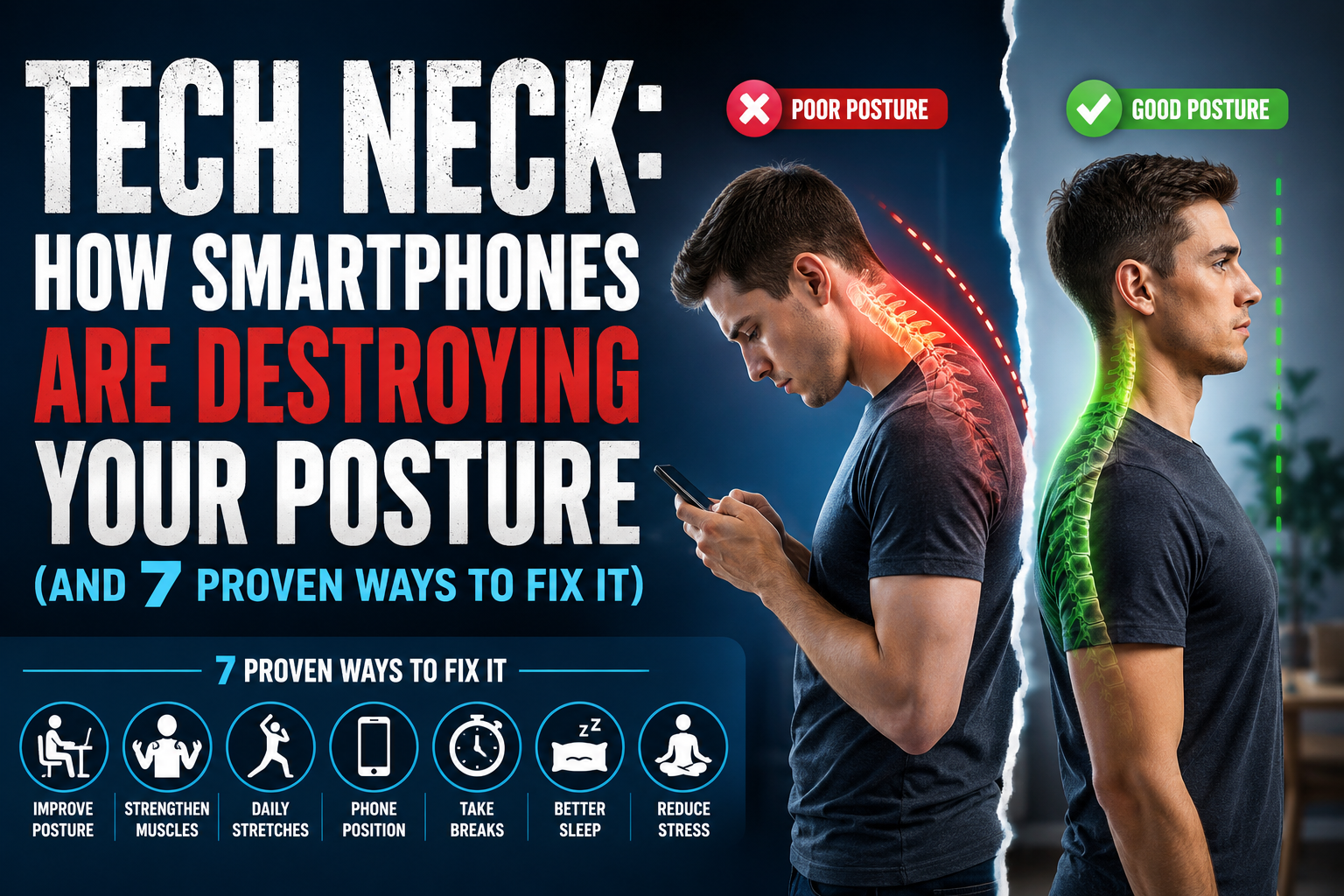
 The most common effect of excessive smartphone use is forward head posture.
Instead of your ears aligning over your shoulders, your head drifts forward.
This position causes:
- Neck strain
- Upper back pain
- Tight shoulders
- Increased spinal stress
The body begins adapting to this poor posture, making it harder to maintain proper alignment naturally.
2. Rounded Shoulders
 When using a smartphone, many people unconsciously hunch forward.
This leads to:
- Tight chest muscles
- Weak upper back muscles
- Rounded shoulders
- Reduced shoulder mobility
Over time, this posture can become your body’s default position.
3. Increased Risk of Chronic Pain
 Constant strain on the cervical spine can contribute to:
- Chronic neck pain
- Shoulder tension
- Upper back discomfort
- Headaches
- Reduced range of motion
For some individuals, symptoms become severe enough to affect daily activities and sleep quality.
4. Reduced Breathing Efficiency
 Poor posture doesn’t just affect your spine.
When your shoulders round forward and your chest collapses, lung expansion becomes restricted.
This can result in:
- Shallow breathing
- Reduced oxygen intake
- Increased fatigue
- Lower energy levels
5. Accelerated Spinal Wear
 Long-term poor posture can contribute to premature wear and tear of spinal structures.
Potential complications include:
- Disc degeneration
- Nerve compression
- Cervical spine dysfunction
- Long-term mobility limitations
While smartphones aren’t the sole cause, they significantly contribute to these issues when combined with sedentary lifestyles.
Common Symptoms of Tech Neck
Many people don’t realize they have tech neck until symptoms become persistent.
Watch for these warning signs:
✔ Neck stiffness
✔ Shoulder tension
✔ Frequent headaches
✔ Upper back pain
✔ Reduced neck mobility
✔ Tingling in arms or hands
✔ Poor posture when standing
✔ Jaw discomfort
✔ Muscle fatigue
If these symptoms occur regularly, it’s time to address your posture habits.
Who Is Most at Risk?
Students
Students often spend several hours daily using phones, tablets, and laptops for both education and entertainment.
Office Workers
Remote work and desk jobs create the perfect environment for tech neck to develop.
Gamers
Long gaming sessions often involve prolonged forward head posture.
Social Media Users
People who frequently scroll social media can spend multiple hours each day looking down at screens.
Remote Workers
Video calls, computer work, and smartphone usage combine to increase risk significantly.
7 Proven Ways to Fix Tech Neck
The good news is that small changes can make a huge difference.
1. Raise Your Phone to Eye Level
One of the simplest solutions is to stop looking down.
Instead:
- Hold your phone higher
- Bring the screen closer to eye level
- Keep your chin tucked
This reduces stress on the cervical spine almost immediately.
Recommended Product
Phone Stand for Desk
A quality adjustable phone stand encourages better viewing angles and reduces neck strain.
👉 Amazon Affiliate Recommendation: Adjustable Aluminum Phone Stand
2. Practice Chin Tucks Daily
Chin tucks strengthen deep neck flexor muscles and improve head alignment.
How to Perform
- Sit upright.
- Pull your chin backward.
- Keep your eyes level.
- Hold for 5 seconds.
- Repeat 10 times.
This simple exercise helps reverse forward head posture.
3. Strengthen Your Upper Back
Weak upper back muscles often contribute to poor posture.
Focus on exercises such as:
- Rows
- Face pulls
- Reverse flys
- Resistance band pull-aparts
Building strength in these areas helps keep shoulders properly aligned.
Recommended Product
Resistance Bands Set
Resistance bands make posture exercises convenient at home.
👉 Amazon Affiliate Recommendation: Resistance Loop Bands Set
4. Improve Your Workstation Ergonomics
Many cases of tech neck stem from poor desk setups.
Ensure:
- Monitor is at eye level
- Keyboard is positioned comfortably
- Chair supports neutral posture
- Feet remain flat on the floor
Recommended Product
Laptop Stand
A laptop stand raises screens to proper viewing height.
👉 Amazon Affiliate Recommendation: Adjustable Laptop Stand
5. Stretch Tight Muscles Regularly
Certain muscles become excessively tight due to prolonged screen use.
Important stretches include:
Chest Stretch
Opens rounded shoulders.
Upper Trapezius Stretch
Reduces neck tension.
Levator Scapulae Stretch
Targets common tech neck discomfort.
Doorway Stretch
Improves shoulder positioning.
Stretching for just 5–10 minutes daily can significantly reduce discomfort.
6. Use a Posture Corrector
Posture correctors can provide gentle reminders to maintain proper alignment.
They are particularly useful for:
- Office workers
- Students
- Remote workers
However, they should support—not replace—muscle strengthening exercises.
Recommended Product
Posture Corrector Brace
👉 Amazon Affiliate Recommendation: Adjustable Back Posture Corrector
7. Follow the 20-20-20 Rule
Most people know this rule for eye health, but it also helps posture.
Every 20 minutes:
- Look 20 feet away
- For 20 seconds
- Stand up and move if possible
Frequent breaks prevent prolonged strain from accumulating throughout the day.
Best Amazon Products for Tech Neck Relief
If you’re building an Amazon affiliate article, these products are highly relevant and commonly searched:
1. Adjustable Phone Stand
Best for reducing downward viewing angles.
2. Laptop Stand
Improves workstation ergonomics.
3. Resistance Bands
Supports posture-strengthening exercises.
4. Cervical Neck Pillow
Promotes spinal alignment during sleep.
5. Posture Corrector Brace
Provides posture awareness throughout the day.
6. Ergonomic Office Chair
Supports long-term spinal health.
7. Massage Gun
Helps relieve muscle tension caused by poor posture.
Can Tech Neck Be Reversed?
In many cases, yes.
Mild to moderate tech neck often improves through:
- Better posture habits
- Regular exercise
- Ergonomic adjustments
- Reduced screen strain
The sooner corrective action begins, the easier recovery tends to be.
Severe cases involving chronic pain or nerve symptoms should be evaluated by a healthcare professional such as a physical therapist, chiropractor, or orthopedic specialist.
How Long Does It Take to Fix Tech Neck?
Results vary depending on severity.
Many people notice improvements within:
- 1–2 weeks of consistent stretching
- 3–6 weeks of strengthening exercises
- Several months for significant posture correction
Consistency matters more than intensity.
Small daily improvements compound into lasting posture changes.
Final Thoughts
Smartphones have become essential parts of modern life, but their convenience comes with hidden costs.
Tech neck is one of the most common posture problems of the digital age, affecting students, professionals, gamers, and virtually anyone who spends time on a screen.
The encouraging news is that fixing tech neck doesn’t require expensive treatments or complicated programs.
By improving ergonomics, strengthening supporting muscles, stretching regularly, and using helpful posture tools, you can dramatically reduce neck pain and restore healthier posture.
Your future self—and your spine—will thank you for taking action today.
FAQ Schema (SEO Bonus)
What is tech neck?
Tech neck is a posture-related condition caused by repeatedly looking down at smartphones, tablets, and other digital devices, leading to neck pain and spinal strain.
Can tech neck cause headaches?
Yes. Poor posture and neck muscle tension often contribute to tension headaches and discomfort around the base of the skull.
Is tech neck permanent?
No. Most cases improve significantly with posture correction, exercise, stretching, and ergonomic changes.
What is the best exercise for tech neck?
Chin tucks are among the most effective exercises for correcting forward head posture associated with tech neck.
Can a posture corrector help tech neck?
Yes. A posture corrector can provide awareness and support, especially when combined with strengthening exercises and ergonomic improvements.